
Webhooks and events
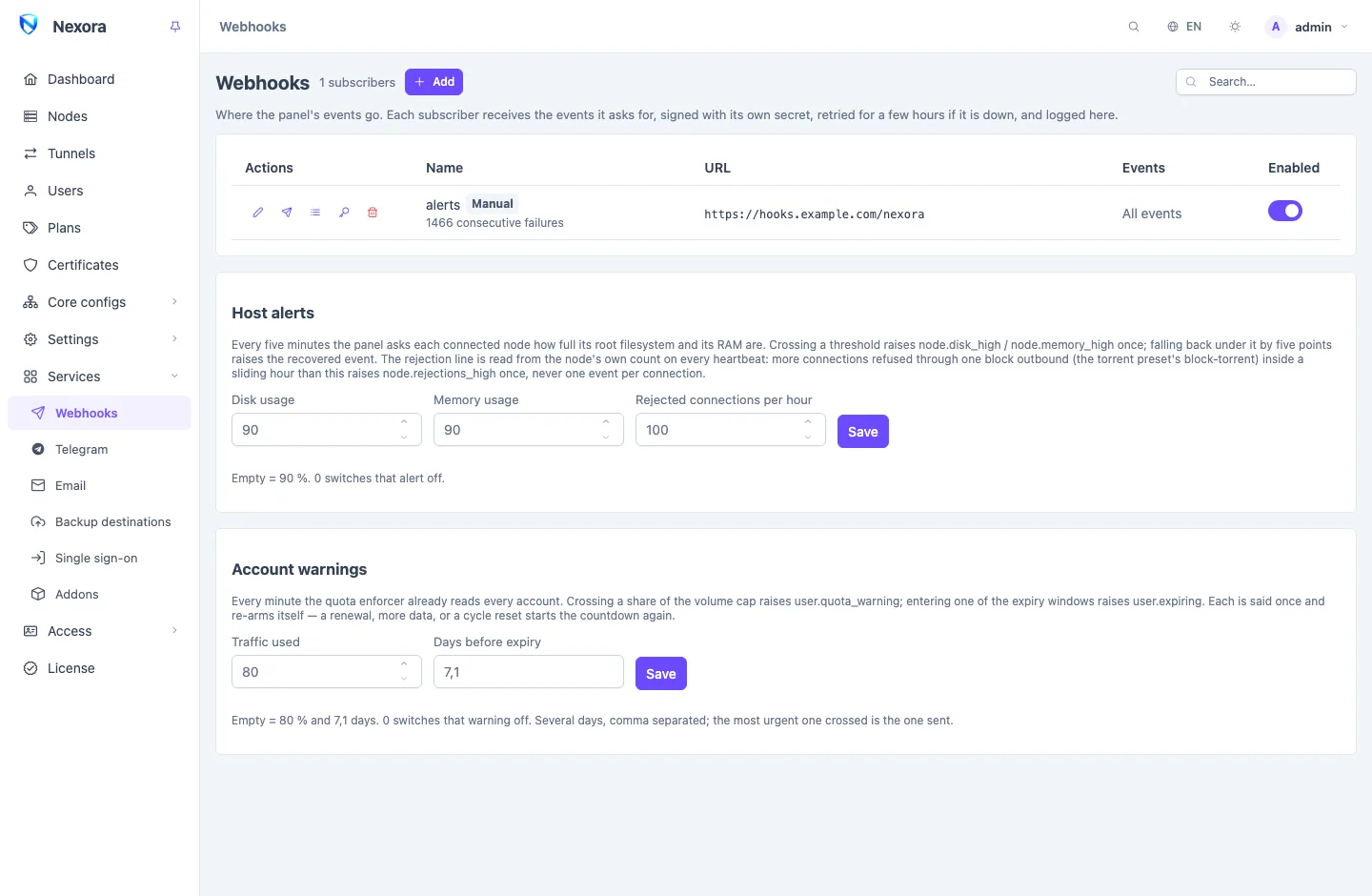
The panel raises an Event whenever something worth knowing happens: a customer about to run out of traffic, a node going down, a login from a new address, a backup that failed. A webhook subscriber is an address of yours that receives the events it asks for, as signed HTTPS requests. This page covers adding subscribers, checking what reached them, and setting the thresholds of the alerts. It is under Services → Webhooks.
Telegram chats and email addresses hear the same events through their own pages: see Telegram and Email. Every event and its fields are listed in Event catalogue; how the bus works inside is in The event bus.
Adding a subscriber
- Add.
- Name: what the receiver is.
- URL: where the panel sends each event, by
POST. - Events: leave All events to receive every event, including events a later release adds, or untick it and choose.
- Only events about: leave Everyone, or pick one account to receive only the events that concern it: a reseller's users, its own logins.
- Belongs to: leave No addon (manual webhook) unless the receiver is your own addon running beside the panel (below).
- Save.
The panel then shows the Signing secret once. Give it to the receiver, which uses it to check that a request came from your panel.
Send test event on the row sends a panel.ping to that subscriber at once and shows what the receiver answered.
Which addresses are allowed
A URL typed here may not point at the panel's own host or its private network: loopback, private ranges, link-local and similar addresses are refused when the panel connects. This keeps a webhook from being used to reach services that are meant to stay inside.
A webhook that belongs to an addon's token (Belongs to) may reach this host and its private network, such as a Docker network, because that is where an addon beside the panel runs. Link-local and metadata addresses stay refused for it too. Belongs to cannot be changed later. A signed addon registers its own webhook; see Addons page.
What a delivery looks like
Each event is a POST with a JSON body:
{
  "v": 1,
  "id": 4182,
  "event": "node.disconnected",
  "time": 1760180000,
  "data": { "nodeId": 3, "name": "de-1", "status": "error", "message": "connection refused" }
}
and these headers:
| Header | Carries |
|---|---|
X-Nexora-Event | the event name, as in the body |
X-Nexora-Delivery | this delivery's id; the same on every retry |
X-Nexora-Signature | t=<unix seconds>,v1=<hex> |
The v1 value is HMAC-SHA256(secret, "<t>.<body>"): the timestamp, a dot, then the raw body exactly as received. The receiver computes the same value with its secret, compares the two in constant time, and refuses a request whose t is more than five minutes from its own clock. The full envelope and a worked example are in Event catalogue.
A 2xx answer is a delivery. Anything else, a redirect included, or no answer within ten seconds, is a failure. Redirects are not followed.
Payloads are thin: ids, names and figures, never a password, key or subscription link. A receiver that needs more reads it from the API with a token (see API tokens).
Retries and the failure streak
A failed delivery is tried again after 30 seconds, then after twice as long each time, up to an hour between tries, with a little random spread so a receiver coming back is not hit by every retry at once. After ten tries the delivery is given up as Dead. That spans about three hours.
Deliveries to one subscriber go one at a time and in order, so a receiver sees user.disabled before the user.enabled that followed it.
A subscriber that keeps failing is switched off on its own, but only when both are true: fifty failures in a row, and the first of them more than a day ago. A receiver that is down for an hour is not switched off, so it gets its backlog when it comes back. A switched-off subscriber shows how many attempts failed. Fix the receiver, then switch the subscriber on again, which starts its count over.
Every delivery that is dead is counted in the panel's metrics, so you can alert on it from outside: see Monitoring and metrics.
The delivery log
Deliveries on a row lists what was sent to that subscriber: the event, when, the attempt number, the receiver's status code, the error, and the status (Pending, Delivered or Dead), with the time of the next attempt for a pending one.
Send again on any delivery queues it once more, with a fresh count of tries. It keeps its X-Nexora-Delivery id, so a receiver that ignores ids it has seen will ignore it too.
The log keeps seven days by default. The event_retention_days setting (up to 90) changes it, with nexora-panel config set (see Command line).
Rotating the secret
Rotate secret on a row makes a new signing secret and shows it once. Update the receiver first: the old secret stops working with the next delivery.
A subscriber marked Unsigned came over from the single webhook address older panels had and has no secret, so its deliveries carry no signature. Rotate a secret in and give it to the receiver.
Host alerts
The Host alerts card sets when the panel raises its node alerts:
| Field | Default | Raises |
|---|---|---|
| Disk usage | 90 % | node.disk_high when a node's root filesystem crosses it, node.disk_recovered when it is five points back under |
| Memory usage | 90 % | node.memory_high and node.memory_recovered, the same way |
| Rejected connections per hour | 100 | node.rejections_high when one node refuses more connections than this through one block outbound inside a sliding hour |
Disk and memory are read from each connected node every five minutes. The rejection count comes from the node itself on every heartbeat: it counts connections refused through a block outbound, such as the torrent preset's block-torrent (see Routing and DNS). Each alert is raised once per crossing, never once per reading or per connection. 0 switches that alert off.
Account warnings
The Account warnings card sets the two warnings about accounts that still work:
| Field | Default | Raises |
|---|---|---|
| Traffic used | 80 % | user.quota_warning when an account crosses that share of its traffic |
| Days before expiry | 7,1 | user.expiring when an account enters one of these windows before its date |
Several days are separated by commas; the most urgent one crossed is the one sent. Each warning is said once and re-arms itself: a renewal, more traffic or a usage reset starts the countdown again. 0 switches that warning off.
Addons' webhooks
A webhook that an addon holds is shown with an Addon: name tag. It cannot be edited or deleted here; manage it with the addon on the Addons page page. Its switch can still be turned back on here if the failure streak switched it off.
Related
- Event catalogue: every event, its fields and who may read it.
- The event bus: how the event bus works.
- Telegram and Email: the same events for people.
- API tokens: read more than an event carries.