
Subscriptions and the subscription page
Every User has one Subscription address. Their app fetches it and gets every way they can reach your fleet, in the format the app reads. Opened in a browser, the same address shows the subscription page. This page covers the settings that shape both. How the entries are put together is in From a template to a link.
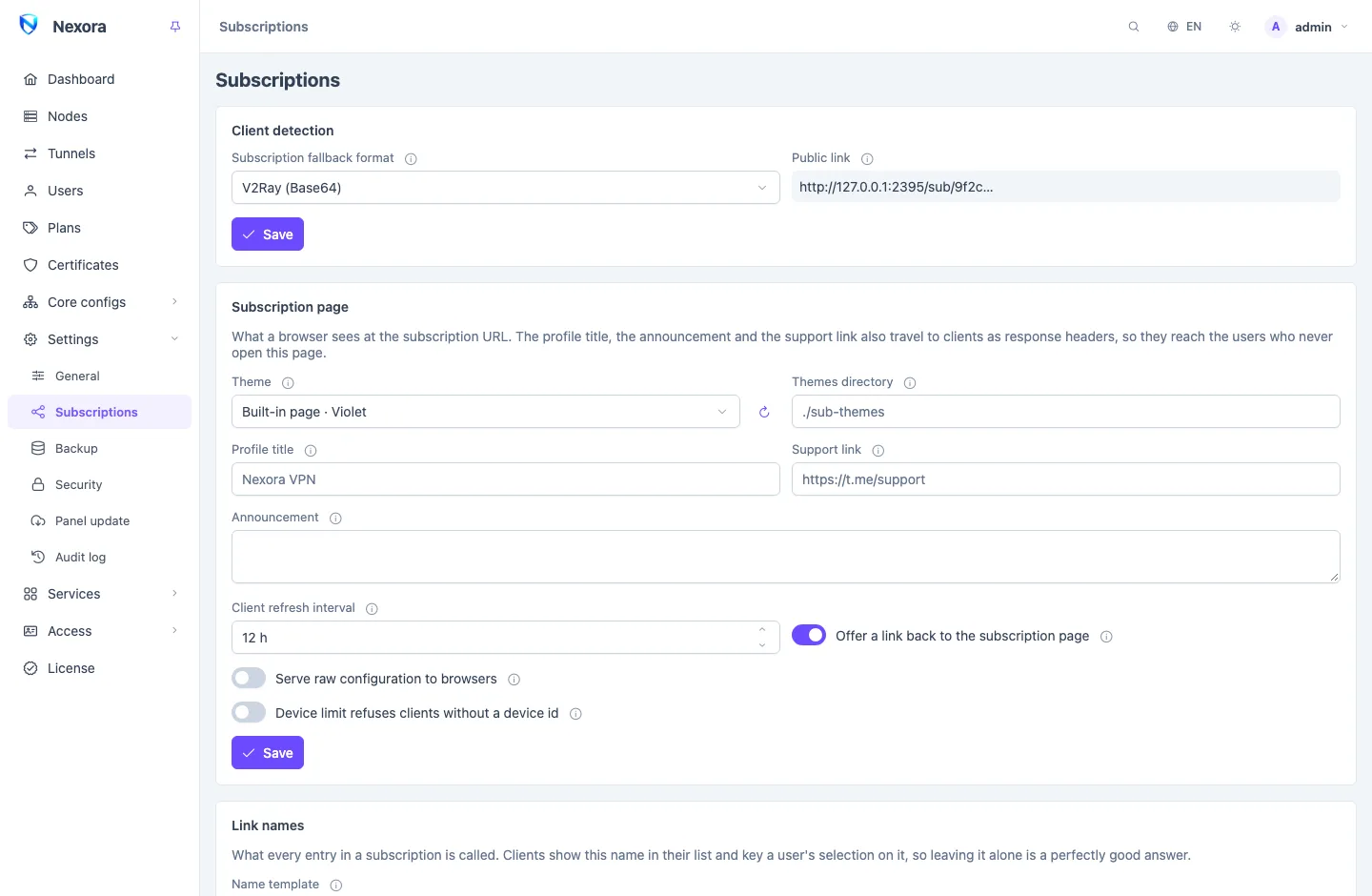
The settings are split between two pages: where links point is on Settings → General, and everything else is on Settings → Subscriptions. Changes apply on users' next fetch; nothing is sent to nodes.
Where links point
Settings → General → Subscriptions & integrations.
Subscription domains
Subscription domains (optional) is a list of host names users' links are built on, such as sub.example.com. Up to eight.
- New links use the first domain. Every domain in the list keeps serving the links already handed out.
- To replace a domain that stopped working, add the new one, move it to the top, and keep the old one in the list while users' apps refresh onto the new links. Removing a domain from the list is what cuts its links off.
- Write each one as a host alone, with no port and no path. Links use the panel's port, or none when a Public address is set.
- Each domain needs a DNS record pointing at the panel, and a place on the panel's certificate. Saving the list reissues the panel's own certificate to cover every domain; a certificate you manage yourself needs them added by you.
On a subscription domain, the panel answers subscriptions, and the panel itself only at its base path. With no base path set, those names serve subscriptions and nothing else.
DANGER
With no panel base path and no panel domain, listing the address you manage the panel from as a subscription domain locks you out of the panel. Set a base path first. To recover, clear the list from the server's command line; see Command line.
A hostname per subscriber
Write a domain with a wildcard, *.sub.example.com, and every subscriber gets their own host name under it, such as k4m2xr8qvp.sub.example.com. One name that stops working then affects one customer, not your whole book.
- The name is worked out from the user's account, so it stays the same on every refresh. It cannot be traced back to the subscription, and the same user gets an unrelated name under each wildcard domain.
- You need a wildcard DNS record,
*.sub.example.com, pointing at the panel. Without it the names resolve for nobody. - The panel's own certificate covers the wildcard automatically.
- Exactly one level is served:
abc.sub.example.com, nota.b.sub.example.com.
The main admin can also give each Reseller its own subscription domain from the list, so its customers' links use that domain. See Resellers.
Base path and public address
- Subscription base path (optional): the path subscription links are built under. It must differ from the panel's base path.
- Public address: the panel's public origin, such as
https://vpn.example.com. With no subscription domain, links are built on it instead of on whatever address the request came in on. Set it when addons or scripts call the panel by a private name, so the links they hand out work for users. A subscription domain still wins over it.
Formats for each app
The panel answers each app in the format it reads, and recognises most apps by themselves:
| Format | Apps |
|---|---|
Share links, base64 (v2ray) | Happ, v2RayTun, INCY, Streisand, v2rayN, v2rayNG, Shadowrocket, NekoBox, V2Box |
Clash (clash) | Clash Meta, mihomo and Stash based apps |
sing-box profile (singbox) | sing-box apps (SFA, SFI), Hiddify, Karing |
Xray JSON profile (xray) | Xray-based apps that import a full JSON profile |
Plain share links (plain) | Anything that wants the links one per line |
An app the panel does not recognise gets the Subscription fallback format, under Client detection. A link can also name its format: the address followed by /clash, /singbox, /xray or /plain.
Not every app can use every inbound. An inbound an app's format cannot express is left out of that app's file rather than included half-working; the protocol pages say which.
Subscription defaults holds the base configuration each of the Clash, sing-box and Xray formats is built from, one tab each. The generated entries are merged into it. Leave a tab empty to use the built-in base.
Naming the entries
Link names sets what every entry in a subscription is called. Empty, the default, keeps the names the panel has always produced. Apps remember a user's chosen server by its name, so changing names on a running service moves everyone's selection.
The Name template is text with variables:
{USER} · {ROUTE} · {REMAINING}        →   ali · CDN · 42.1 GB
{INBOUND}-{NODE} → vless-ws-de-1| Variable | |
|---|---|
{USER}, {USER_REMARK} | The account's name and remark |
{INBOUND}, {PROTOCOL}, {NETWORK} | The inbound's tag, protocol and transport |
{NODE}, {NODE_REMARK} | The node; empty on a front entry |
{ROUTE} | The label of the node address or of the front the entry uses |
{SERVER}, {PORT} | What the entry dials |
{USED}, {REMAINING}, {TOTAL} | Traffic; ∞ with no limit |
{DAYS_LEFT}, {EXPIRE} | Days left and the expiry date; ∞ with no expiry |
{EXPIRE_JALALI} | The expiry date in the Solar Hijri calendar |
- Anything not in the list is left exactly as written, so a misspelt variable shows instead of vanishing. A template with no known variable is refused.
- An empty variable takes its separator with it:
{USER}-{NODE}-{INBOUND}on a front entry givesali-vless-ws. - Dates and amounts match the subscription page, in the panel's timezone.
- Preview shows the result on a sample account, rendered by the panel itself.
App config files (.conf, .ovpn) keep their own file names.
What apps are told
A subscription answer also carries headers that many apps show without the user opening anything:
| Setting | Sent as | Shown by |
|---|---|---|
| Profile title (or the user's remark) | Profile-Title | Happ, v2RayTun |
| The user's quota, usage and expiry | Subscription-Userinfo | Happ, v2RayTun, Clash Meta |
| Client refresh interval | Profile-Update-Interval | Happ, v2RayTun |
| Announcement | Announce | Happ, v2RayTun |
| Support link | Support-Url | Happ |
| Offer a link back to the subscription page | Profile-Web-Page-Url | Happ |
- Client refresh interval is in hours; empty means 12.
0sends no header and leaves each app on its own default. - Switching off Offer a link back to the subscription page removes the header rather than sending an empty one.
- Text in Persian, Russian or Chinese is sent encoded so apps show it correctly. An announcement is one line: line breaks become spaces.
- Happ shows about 25 characters of a title and about 200 of an announcement.
The subscription page
Opened in a browser, the subscription address shows a page with the user's usage, expiry, the history of their traffic, and each way to connect with a QR code, a copy button and buttons that import the subscription into common apps. WireGuard, OpenVPN and OpenConnect users also get their app config files there. The page follows the user's browser language.
Settings → Subscriptions → Subscription page:
| Setting | |
|---|---|
| Theme | Built-in page · Violet (the default), Built-in page · Amber, or one of your own themes |
| Themes directory | Where your own themes are read from. Main admin only |
| Profile title, Support link, Announcement | Shown on the page, and also sent to apps as headers |
| Serve raw configuration to browsers | Turns the page off: a browser gets the same answer an app does |
Your own theme
A theme is a directory in the themes directory holding an index.html (or sub.html) and any files it uses. The default directory is /var/opt/nexora/sub-themes/ on a standard install, and ./sub-themes next to the compose file in Docker. Drop a directory in, click Rescan the themes directory, and pick it under Theme. No restart.
- Directory names may use letters, digits,
.,_and-. - Edits show within a few seconds.
- A theme that fails to load or render falls back to the violet page, so a bad edit never costs a user their subscription. The panel log says why.
- The two built-in pages are good starting points: each is one self-contained
index.html.
To preview a theme, open a user's subscription address with /page added.
For theme authors. The page is an HTML template filled in by the panel. It receives the user (.User: name, remark, status, online), their traffic (.Usage, as numbers and formatted text), .Expire and .Reset, their traffic history laid out as SVG bars (.Chart), each way to connect (.Links, .Configs), the WireGuard, OpenVPN and OpenConnect files (.Apps), the subscription address in each format with ready import links for apps (.Sub), your title, support link and announcement (.Panel), and the visitor's language with the built-in page's translated phrases (.Lang, .Dir, .T). Helper functions format bytes and dates and draw QR codes. Files next to index.html are served under the address in .AssetBase. Adding /info to the subscription address returns the same data as JSON, without the links, for a page that refreshes itself. A theme can only format what it is given: it cannot reach the database, the disk or the network.
Encrypted import links
INCY and V2RayTun can import a subscription from an encrypted link that does not show the subscription address. On the INCY and V2RayTun tabs of Subscription defaults, Fetch key from INCY or Fetch key from V2RayTun stores each app's key, and the page's import buttons for that app switch to the encrypted form. Remove the key to go back to plain links.
Device limit, strict mode
A user's device limit counts the devices that identify themselves when they fetch the subscription. Most apps, and every browser, send no device id.
Device limit refuses clients without a device id decides what happens to them:
- Off (default): apps without a device id are served, and the limit governs only those that identify themselves.
- On: a user with a device limit gets their subscription only on devices that say who they are.
Turn it on only when all your users run apps that send a device id. See Users.
Tell users to turn Mux off
Xray-based apps (v2rayNG, v2rayN, Streisand) have a Mux switch. Your nodes do not speak the multiplexing protocol it turns on, so with Mux on the connection simply fails, with no message the user can act on. The panel cannot switch it off from its side.
The subscription page warns users about it in their language, under Advanced. Repeat it in your own setup instructions. The multiplexing settings in sing-box and Clash apps are a different feature and are fine.
One more for v2rayNG: Update subscription refreshes only the group shown on screen. A user who imports your link and updates while another group is open sees an empty list and no error. Tell them to open the new group's tab first.
Related
- From a template to a link: how entries are built from nodes, addresses and fronts.
- Domain fronting: CDN fronts, which add entries.
- Nodes: link addresses, which add entries.
- Users: a user's subscription link and QR code.