
Domain fronting
A domain front is a CDN hostname that users' apps dial instead of your node. The CDN takes the connection, works out your server from the hostname it was given, and opens its own connection to your node. Users then connect to the CDN, and your node's address does not have to appear in their subscription at all.
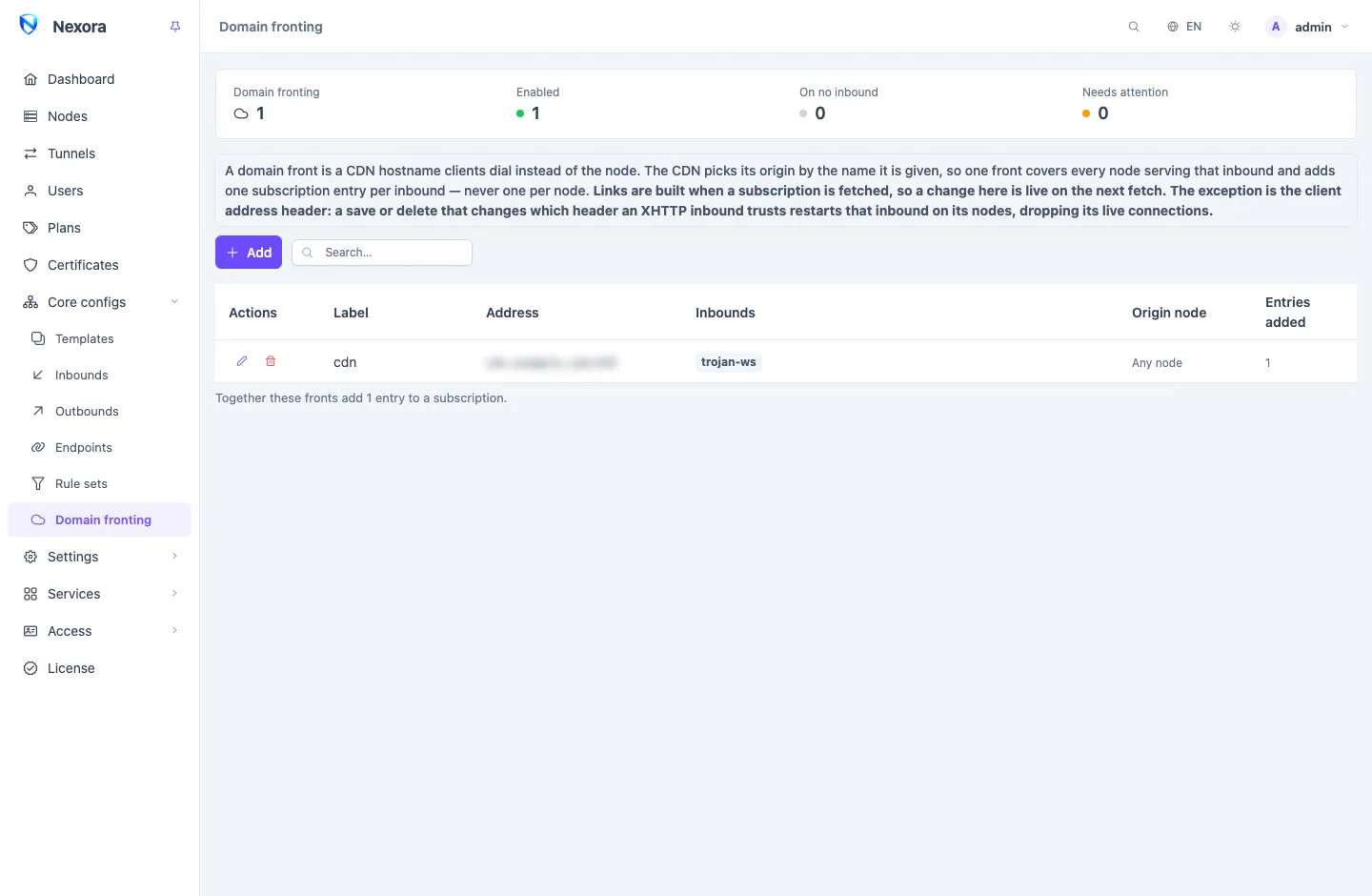
Fronts live under Core configs → Domain fronting. You can have up to eight, and an inbound can carry up to four.
How a front adds to a subscription
A front belongs to an inbound, not to a node. The CDN picks which of your servers to talk to, so one front covers every node that serves the inbound, and it adds one entry per inbound to a user's subscription, never one per node.
Three nodes serving one inbound, each with two link addresses, and two fronts on that inbound:
3 nodes × 2 addresses = 6 direct entries
              2 fronts = 2 front entries
                         ───────────────
                         8 entries
Fronts and node addresses add up; they never multiply. The page shows how many entries each front adds.
Which inbounds can be fronted
A CDN ends the TLS connection itself and forwards HTTP requests to your server. So an inbound can be fronted only when it speaks HTTP over a transport the CDN carries:
WebSocket, HTTPUpgrade, gRPC, XHTTP and HTTP/2.
The panel refuses the others when you save, from either the front or the inbound, and says why:
| Refused | Why |
|---|---|
| REALITY | It is tied to the inbound's own key, and a CDN presents its own certificate. They cannot work together. |
| Hysteria, Hysteria2, TUIC | They run over QUIC (UDP); a CDN forwards HTTP. |
| Port hopping | The port range belongs to the node's own listener; a front is one hostname on one port. |
| Raw TCP, AnyTLS, ShadowTLS, SOCKS, SSH and similar | A CDN cannot carry a stream that is not an HTTP request. |
| XHTTP sending its upload in a header or a cookie | A CDN does not carry the payload in those places. |
For any of these, add a second address to the node instead: see the node's link addresses in Nodes. The VLESS + WebSocket + TLS and VLESS + gRPC + TLS inbound presets are made for fronting.
Setting up a front
On your CDN, first:
- Add the hostname, proxied through the CDN (in Cloudflare, the orange cloud).
- Point it at your node's address as its origin.
- If the inbound has no TLS of its own behind the CDN, allow plain HTTP to the origin. This is common and fine: the user's encrypted connection is with the CDN.
Then in the panel, on Core configs → Domain fronting, click Add:
| Field | |
|---|---|
| Label | Names the front, and is added to the names of the entries it renders, so two fronts on one inbound are told apart. |
| Address | The CDN hostname apps dial. *.cdn.example.com gives each subscriber their own (below). |
| Port | Blank means 443. This is the CDN's port, not the inbound's. |
| SNI, Host | Blank sends the front's own hostname, which is what a CDN expects. Fill them in only if your CDN needs another name at the origin. |
| ALPN, Fingerprint, Allow insecure | The app's TLS towards the CDN. A CDN has a valid certificate, so leave Allow insecure off. |
| Client address header | See the client address header. |
| Origin node | Optional. See below. |
| Order | Where this front's entries sit in a subscription. |
| Inbounds | The inbounds it reaches. Only inbounds a CDN can carry are offered. |
You can also enable fronts from the other side: an inbound's own Domain fronting tab lists the fronts on it. It is the same setting seen from the inbound.
A front entry takes the address, port, SNI, Host, ALPN and fingerprint from the front, and the path and everything else from the inbound. It drops any certificate pin and port-hopping range, since the CDN presents its own certificate.
Front changes reach users on their next subscription fetch; nothing is sent to nodes, except for the client address header.
A hostname per subscriber
Write the address as *.cdn.example.com and every subscriber gets their own hostname under it, such as k7m2rq9xdp.cdn.example.com. One hostname that stops working then affects one customer, not all of them.
- The name is worked out from the user's subscription, so it is the same every time their app refreshes, and different for every user. It cannot be traced back to the subscription.
- You need a wildcard DNS record,
*.cdn.example.com, proxied through the CDN. Without it the names resolve for nobody. - Check that your CDN's certificate covers the name. On Cloudflare, the free Universal SSL certificate covers
example.comand one level below it (*.example.com), not*.cdn.example.com. Either put the wildcard directly under your zone, or use a Cloudflare plan that issues certificates for deeper names. Other CDNs have their own rules.
Origin node
Origin node says which node the CDN forwards to. It does not add entries. The panel uses it to leave the front out of the subscription of a user who is not on that node, since the entry could not log in there, and to warn you when that node does not serve an inbound you enabled the front on. Leave it as Any node when your CDN chooses the origin.
Only through a front
An inbound's Only through a front switch, on its Domain fronting tab, drops the inbound's direct entries from subscriptions, so the node's address appears nowhere in the user's file.
It applies per user, and only where a front was actually written for that user. A user whose fronts were all left out (for example by an origin node they are not on) keeps the direct entries rather than getting an empty file. With no front enabled on the inbound, the switch does nothing.
The client address header
Behind a CDN, every connection to your node comes from the CDN's addresses. Client address header names the header in which the CDN passes on the user's real address: CF-Connecting-IP for Cloudflare, True-Client-IP for Akamai, Fastly-Client-IP, or AR-Real-IP for ArvanCloud.
When it is set, every XHTTP inbound the front is enabled on reads the user's address from that header, so device and address limits and the logs see the real user. The address is only trustworthy when:
- the CDN writes the header itself, rather than passing on one the app sent (check your CDN's documentation);
- the node accepts connections only from the CDN, since an app that reaches the node directly could send the header too;
- every front on the inbound names the same header.
Changing this header is the one front change that reaches nodes: it restarts the affected XHTTP inbounds there, which drops their live connections.
Inbounds behind an ingress
An ingress routes by the name in the TLS handshake. The CDN connects to your node with the front's hostname, so an ingress route that does not list that hostname sends the traffic to its fallback. Add the front's hostname to the route, or a suffix such as .cdn.example.com that also covers a wildcard front. The panel warns until you do.
Related
- Inbounds: the inbounds a front reaches.
- Subscriptions and the subscription page: subscription domains, which can use wildcards the same way.
- Nodes: link addresses, the alternative for inbounds a CDN cannot carry.
- From a template to a link: how a subscription is put together.